
API in Asynchronous mode
Asynchronous Mode in Netcore SMS API
API in Asynchronous mode
-
Messages can be sent out using Synchronous or Asynchronous mode. In Asynchronous mode, the API call will return immediately with the Request ID of the call – the complete input validation and message sending will be done asynchronously.
-
This way the call made does not have to wait for the complete processing to be done. In the default mode / synchronous, on the API will return a very detailed response XML; with the transaction ID, message ID for every message sent.
-
To use the API in the asynchronous mode, use the parameter: async =1.
-
Here‘s the sample XML returned in Asynchronous API mode:
<RESULT REQID ='29749608774'> </RESULT>
`
Supported Message Types
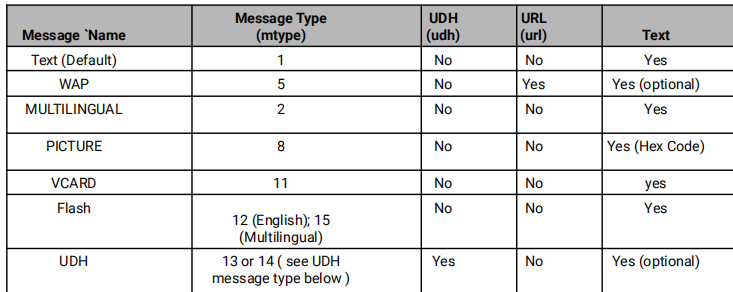
- The most common message type that needs to be sent out by an Enterprise is a simple text message. The SMS API can be used to send WAP messages, flash message, Vcard message, as well as UDH. UDH and Binary messages can be sent using the Single Message API, Here‘s a quick reference guide on the advanced parameters that needs to be used in each of these cases.
How to send UDH (port based) Message
-
With a brief example, outlining the sample steps to send UDH messages to a port number using Single Message API. In addition to the mandatory parameters as outlined in Section
-
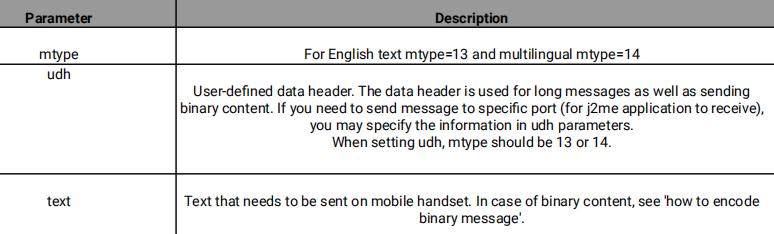
UDH Message Type – additional parameters
-
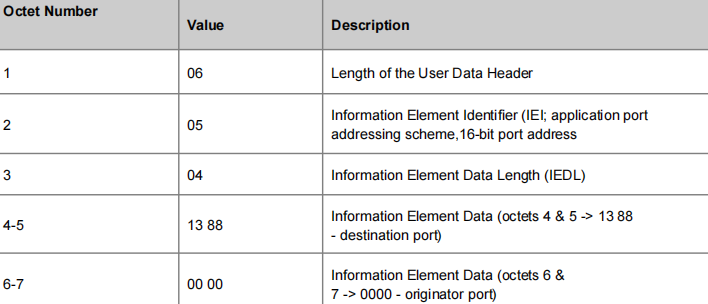
Step 1 : Prepare the UDH byte value with message size less than 140 byte, where application running on 5000 port. (hex value of 5000 = 1388)
06 05 04 13 88 00 00 -
Step 2 : Make it 2-character percent-separated hex
%06%05%04%13%88%00%00 -
Step 3 : URL encode (UTF-8)
%2506%2505%2504%2513%2588%2500%2500 -
Step 4 : Use URL parameters &udh =
%2506%2505%2504%2513%2588%2500%2500
UDH Octet parameter details
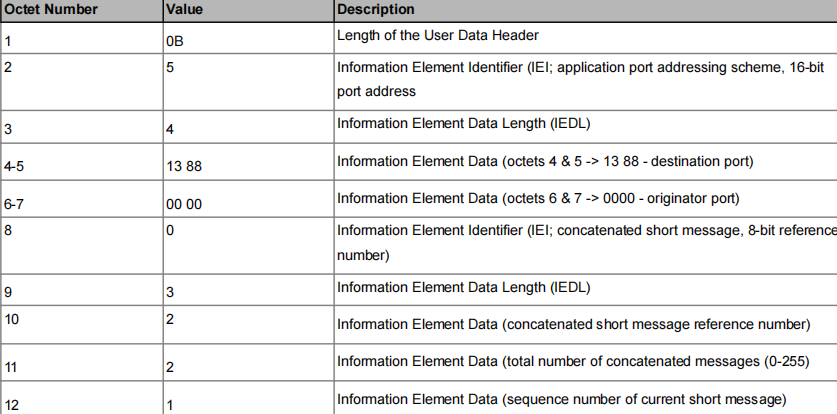
Send Message to a port number with more than 140 bytes
Need to add concatenated message header information
How to encode Binary message
- Step 1. 2-character percent-separated hex
- Step 2. url-encode above
- Step 3. &text=<output of step 2>
For more details about different octet in UDH header, refer netcore's API document.
Note
To send normal text App running on destination port should be able to read ASCII characters. If app understands binary then message must be in binary encoded rather normal text.